Fake GPS Location-GPS JoyStick
- 4.0
- Rating
- 5.00M
- Installs
- Free
- Price

 Analysis by App-foxy
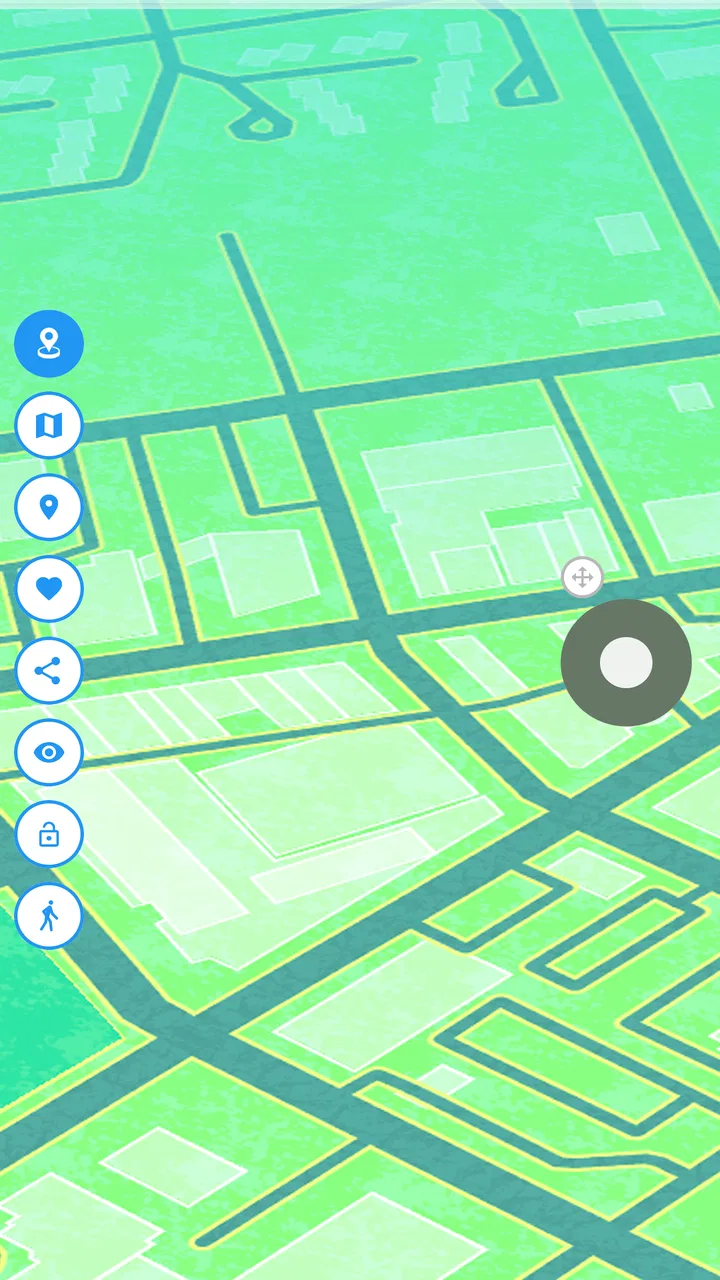
I tested Fake GPS Location-GPS JoyStick as a practical location simulation tool rather than as a conventional navigation app. Its purpose is simple: it lets you set a different GPS position on your phone and move that position with an on-screen joystick. That makes it interesting for testing location-dependent apps, checking how a service behaves in another place, or exploring a map interface without physically traveling there. It is not a replacement for turn-by-turn navigation, and that distinction matters from the first tap.
The app comes from The App Ninjas and sits in the Maps & Navigation category. It is free to install, with optional purchases ranging from under a dollar to several dollars per item. The current release is version 5.3.3, and it works on phones running Android 6.0 or later. Its Everyone age rating makes the basic audience broad, although the consequences of changing a phone’s reported location depend heavily on the other apps being used.
From choosing a place to seeing the new location
I start by choosing the location I want the phone to report, then check how that change appears in the app I’m testing. That simple sequence is more useful than treating the joystick as a shortcut: it helps me separate choosing a place from confirming that another app has actually responded. Next, I look at what can slow that handoff down and how to make the result easier to trust.
You May Also Like

 Blood Strike: 2.5 Anniversary
Blood Strike’s Loadouts Turn Every Drop Into a Tactical Gamble
A close look at Blood Strike’s custom loadouts: how fast access to signature weapons reshapes its battle royale rhythm, rewards preparation, and narrows the gap between fights.

 Pandora - Music & Podcasts
Pandora’s Music Is Easy to Start, but Harder to Recover
Pandora’s strength is its low-effort path from a seed to a station. Its weak spot is how much confidence it asks you to place in connection, setup, and quiet recovery.

 8 Ball Pool
 Is Built on Rivalries, Rematches, and Routine
A close look at the rivalries, rematches, shared routines, and unanswered safety questions that turn a quick pool match into a persistent mobile community.

 Samsung Music
’s Quiet Strength Is Playing What You Already Own
Its reach comes less from spectacle than from dependable access to a personal library. That simplicity is both the app’s strongest retention engine and its ceiling.

 AccuWeather: Weather Radar
AccuWeather Review: A Quick, Clear Forecast for Everyday Decisions
For everyday plans, the best forecast is the one you can understand quickly. AccuWeather makes rain timing, radar, and local conditions easy to act on, with a few trade-offs.

 Hill Climb Racing
Why Hill Climb Racing Still Turns Crashes Into One More Run
A tiny car, a bumpy hill and one more upgrade: Hill Climb Racing keeps resurfacing because its simple chaos makes every near-miss feel personal.
More From Our News Desk



Starting with a clear reason
The smoothest experience begins before opening the app. I first decide what I am trying to accomplish: test a location-based feature, preview a map around a destination, or move a simulated position along a route. That preparation prevents a common mistake, which is treating a fake location as if it were a complete travel tool. The app changes the position reported by the phone; it does not physically move me, provide transport, or guarantee that every service will accept the simulated signal.
A realistic example is a developer checking a delivery interface. The starting condition might be a test phone sitting at home while the app under development expects a courier to appear in another neighborhood. Instead of repeatedly traveling between locations, the tester can set a point in Fake GPS Location-GPS JoyStick, switch to the other application, and observe whether the map marker and location-based screen respond as expected.
There are also less technical uses. I found the joystick useful when I wanted to inspect how a map-based application reacts as a position changes gradually rather than jumping from one distant point to another. That is a more revealing test of location refresh behavior, loading states, and map movement than simply selecting a new point once. It turns a static location check into a small, repeatable workflow.
Picking the initial point
The first important handoff is between the map inside the simulator and the application that will consume the location. I choose the intended area in the simulator, place the virtual position, and then confirm the phone is reporting that position before opening the target app. This order is more reliable than launching the target first and hoping it notices the change immediately.
Searching for a precise place can be more useful than dropping a pin by eye, especially in dense urban areas where nearby streets are close together. When accuracy matters, I take a moment to check the selected point visually on the map. A marker that is merely in the right city may be insufficient for testing a store, building, road, or neighborhood-specific screen.
The joystick is the app’s most distinctive part. After setting the starting point, I can nudge the simulated position instead of repeatedly closing one screen and selecting another location. That is valuable for testing movement-sensitive behavior, but it also introduces a trade-off: slow manual movement gives control, while long simulated journeys become tedious. I would use it for short controlled changes, not for pretending to complete a cross-country trip step by step.
Moving from the simulator to another app
Once the location is set, I switch to the application I actually want to examine. This handoff is where expectations need to stay realistic. Some apps read the phone’s location quickly, while others refresh only after opening a screen, requesting a new position, or restarting part of their interface. If the target still shows the old place, I do not immediately assume the simulator failed. I check whether the target has refreshed and whether its own location controls are overriding what the phone reports.
This workflow is particularly helpful when testing a map screen that has several layers: the phone’s reported position, the target app’s map, and sometimes a search or service area chosen inside that target. Changing the simulated point does not automatically select a new destination inside every service. In practice, I may need to move the phone’s location first, then use the target app’s own search or refresh control to complete the test.
The key handoff is not “set a point and forget it”; it is set, switch, refresh, and verify. That four-part habit saves time because it separates a simulator issue from a target-app issue. It also makes test results easier to reproduce when I need to repeat the same scenario later.
Using the joystick deliberately
The joystick is best treated as a precision control, not a novelty button. I use small movements when I want to see whether a target reacts to gradual changes. For example, a location-based screen might update correctly after a noticeable move but fail to respond to tiny changes. That difference can reveal whether the target is refreshing continuously or only after a larger location event.
Another useful technique is to pause between movements. Moving too quickly can make it difficult to tell which change caused the target app to update. A slower sequence—move, wait, inspect, then move again—produces clearer observations. This is one of the app’s less obvious strengths: it gives me a hands-on way to create controlled location changes instead of relying only on isolated pins.
There is a practical limit, though. A joystick cannot turn a complicated route into an effortless simulation. If I need to validate many turns, stops, or travel segments, manually steering becomes repetitive. A conventional map or a dedicated development testing workflow may be better for route planning, while this app fits short movement experiments and quick checks.
Understanding what the result means
When the target application displays the selected area, the result is useful only if I interpret it correctly. I have confirmed that the phone is presenting a different location to software; I have not proven that every location-related feature will behave as though I am physically there. A service may use additional signals, account information, network context, or its own detection methods. A changed map marker is therefore a test result, not a guarantee of full access to a location-restricted service.
This matters for ordinary users who may expect the tool to unlock every regional feature. The app can be effective for inspecting location-aware behavior, but it is not a universal pass for services that deliberately verify where a user is. If the goal is simply to find nearby restaurants, plan a journey, or navigate safely, the phone’s normal location and a standard maps app are the better choices.
Where the workflow becomes inconvenient
The biggest friction comes from the gap between the simulator and the app being tested. A location change may appear correct in one place but not immediately in another. I sometimes need to return to the simulator, adjust the point, switch back, and refresh the target. That back-and-forth is manageable for a few checks, but it becomes tiring during a long test session.
Another limitation is that the experience depends on the target app’s behavior. Fake GPS Location-GPS JoyStick controls the simulated position, but it cannot redesign how another app requests, caches, or validates location. If the other app behaves inconsistently, the simulator may be blamed even when the real issue is a delayed refresh or a separate location rule.
I also would not rely on it for safety-critical decisions. A simulated position is unsuitable for emergency use, dependable navigation, or any situation where another person needs my true whereabouts. The app is a testing and experimentation tool, and using it outside that role can create confusion or risk.
How it compares with normal navigation tools
Compared with a regular navigation app, this one solves the opposite problem. Navigation software starts with the assumption that the phone should report the real position and then helps me reach a destination. Fake GPS Location-GPS JoyStick starts with a chosen position and helps me see how the phone behaves there. If I want traffic, directions, live travel guidance, or a dependable route, I would choose the usual navigation option instead.
Compared with simply searching another place on a map, the simulator goes one step further by changing the location presented by the device. That makes it more useful for testing screens that react to the phone’s current position rather than to a manually entered search. The trade-off is extra setup and more uncertainty: a search result is usually straightforward, while a simulated location can be ignored or handled differently by the target.
For app developers and testers, the advantage is convenience. A physical trip is unnecessary for a basic location check, and the joystick makes small movements possible. For casual users who only want to browse another city, the normal map search is simpler and less likely to produce confusing results. I would choose this app when the phone itself needs to report the alternate location, not merely when I want to look at a different place.
Who will get the most from it
I think the strongest audience is people testing location-aware applications, QA workers checking map screens, and curious users who understand the difference between viewing a place and simulating a device position. It is also useful for demonstrations where a presenter needs to show how an app responds to movement without changing physical location.
The free entry point makes it easy to try, and the app’s broad compatibility helps if the test phone is not new. Its popularity is substantial, with more than five million installs and an average rating of about four stars from roughly a hundred thousand ratings. Those figures suggest that it has found a real audience, although popularity does not remove the need to check whether a particular target app accepts simulated positions.
The Everyone rating describes the app’s general accessibility, not every possible use of a fake location. I would explain the purpose clearly before using it on a shared phone or during a test involving someone else’s account. Location data can affect expectations about availability and whereabouts, so responsible use matters even when the tool itself is easy to operate.
Who should skip it
I would skip it if my main need is reliable navigation, accurate live positioning, or an uncomplicated way to find nearby places. The app adds a layer of control that those tasks do not require. It can also be a poor fit for anyone who wants a guaranteed way around regional restrictions, because the receiving service may apply checks that a changed GPS position does not satisfy.
It is not ideal for a tester who needs a fully automated, highly repeatable route laboratory. The joystick is convenient for manual exploration, but repeated hand movement can be slow and difficult to document precisely. In that situation, a purpose-built development environment or the target platform’s own testing tools may provide better control.
Practical details before installing
Fake GPS Location-GPS JoyStick is free, while optional in-app items cost from $0.99 to $9.99 each. I would begin with the free experience and only consider a purchase if a specific extra capability solves a problem in my workflow. The app was released on February 21, 2019, and the listed version is 5.3.3, so users should keep the installed release current when troubleshooting behavior.
Because it requires Android 6.0 or later, compatibility is fairly accommodating for older supported phones, but the operating system alone does not determine how well a target application will respond. The important question is whether the phone, simulator, and receiving app all cooperate during the same test. I would verify that with a harmless map-based experiment before using the setup for anything more complicated.
My final assessment
After using it as a complete workflow—from selecting a starting point, through joystick movement and app handoffs, to checking the final screen—I see Fake GPS Location-GPS JoyStick as a focused utility rather than an everyday maps replacement. Its real value is the controlled gap it creates between where the phone is and where software believes it is. That is genuinely useful for testing and demonstrations.
The best results come from modest expectations and a careful routine: choose a precise point, switch to the target, refresh it, and treat every response as something to verify. The app is less convincing when I expect it to imitate every aspect of physical travel or bypass every location check. If you need controlled location testing on an Android phone, I would recommend giving it a try; if you need trustworthy directions or real-world positioning, use a standard navigation app instead.
For me, that clear boundary is what makes the tool worthwhile. It does one unusual job accessibly, gives the joystick a practical role in short movement tests, and remains easy to try without an upfront price. The friction during handoffs is real, but it is understandable for this kind of utility. Used carefully, it can turn a difficult location test into a repeatable phone-based experiment.
FAQs for Fake GPS Location-GPS JoyStick
01What is Fake GPS Location-GPS JoyStick used for?
Fake GPS Location-GPS JoyStick is an Android location-spoofing app that lets you simulate a different GPS position on your device. It can be useful for testing location-based applications, checking how services behave in another area, or exploring map features without physically traveling. Before using it, remember that changing your location may violate the terms of some apps and services.
02How do I set up Fake GPS Location-GPS JoyStick on Android?
After installing the app, you generally need to enable Developer Options on your Android device and select Fake GPS Location-GPS JoyStick as the mock location application. The exact menu names can vary depending on your Android version and phone manufacturer. The app may also request permission to draw over other apps or access location services for its joystick and on-screen controls.
03Does Fake GPS Location-GPS JoyStick work with every app and game?
No. Compatibility depends on the Android version, device configuration, and the app or game you want to use. Many services detect mock locations, movement patterns, developer settings, or other signs of location spoofing, so the simulated position may be ignored or trigger restrictions. It is most reliable for personal testing and development rather than bypassing location rules in third-party services.
04Is using Fake GPS Location-GPS JoyStick safe and legal?
The application itself is a tool for changing the location reported by your Android device, but how you use it determines whether it is appropriate. Using it for testing, privacy experiments, or app development is generally different from using it to deceive services, obtain rewards, evade restrictions, or interfere with games. Review the terms of each service and avoid actions that could lead to account suspension or other consequences.
05What problems might I experience while using Fake GPS Location-GPS JoyStick?
Common issues can include the location reverting to the real position, the joystick overlay disappearing, inaccurate movement, battery consumption, or other apps refusing to accept the simulated coordinates. Restarting location services, checking mock-location settings, and ensuring the app has the required permissions may help. However, detection by another app cannot always be fixed, especially when strong anti-spoofing protections are enabled.
Pros
- Joystick controls make virtual movement simple and convenient.
- Supports saving favorite locations for quick access later.
- Location simulation can be adjusted without physically traveling.
- Useful for testing location-based apps in a controlled environment.
- The interface is relatively straightforward for experienced Android users.
Cons
- Requires Android developer settings and mock-location configuration.
- Some apps can detect spoofed locations and block access.
- May drain battery when running continuously in the background.
- Compatibility varies across Android versions and device manufacturers.
- Using it against app rules may lead to account restrictions or bans.

Fake GPS Location-GPS JoyStick
Gallery